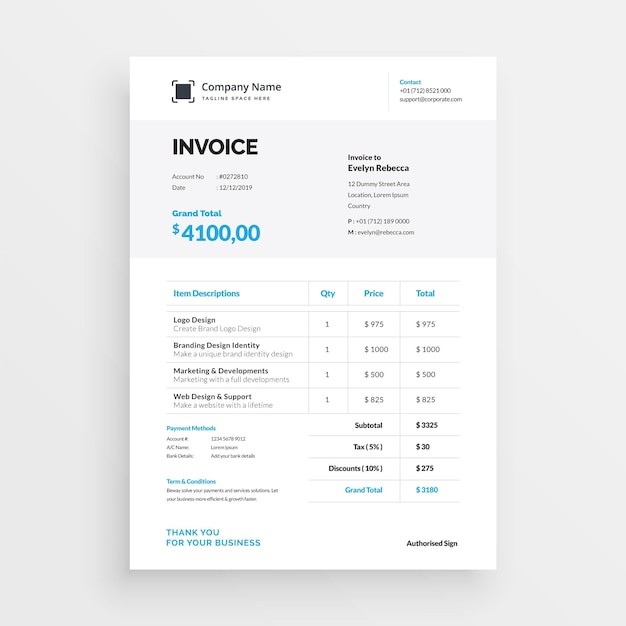
Crafting a Professional Invoice: A Comprehensive Guide
Regardless of the size of your business, creating invoices is an essential part of your financial process. It's not only about getting paid but it's also about keeping accurate records for tax and accounting purposes. In this guide, we will walk you through all the necessary steps to create an invoice, whether you want to create a simple invoice or use a free invoice number generator, or even create an invoice PDF.
Understanding the Role of Invoices
First, let's define what an invoice is. Essentially, an invoice is a document that details the services rendered or products sold to a client, along with their respective costs. It serves as a request for payment and a record of sale for both the business owner and the client.
Key Takeaway: An invoice acts as a detailed bill and record of a transaction, which is crucial in managing your business's cash flow and keeping accurate financial records.
Key Elements of an Invoice
An invoice should be comprehensive and clear to avoid any confusion. Here are the critical elements to include in your invoice:
- Invoice date: This refers to the date when the invoice is issued.
- Business and client's contact details: This includes the name, address, phone number, and email address of both your business and your client.
- Unique invoice number: This helps in tracking invoices. It could be a sequential number or something related to the service period.
- Payment terms: This can include the due date for the payment and any other conditions related to payment.
- Itemized list of products/services: This should clearly state the quantity, unit price, and total price for each item.
- Total amount due: This is the sum of all costs listed in the itemized list.
Tip: Make sure your invoice is detailed and straightforward to prompt your clients to settle their payments promptly.
Step-by-Step Guide to Creating an Invoice
1. Begin with a Header
The header of your invoice should include the date, along with the contact information of both your business and your client. The layout can vary, but generally, your business information is on the left, and the client's information is on the right.
2. Add an Invoice Number
This should be unique for each invoice you send. You can start with "Invoice #0001" for your first invoice or use an identifier related to the service period, such as "Invoice #2021Q1".
3. Create an Itemized List
This is the heart of your invoice. It should include each item, its quantity, the rate per unit, and the total cost. Make sure the total invoice value is bold or highlighted to draw attention.
4. Include Additional Notes
Sometimes, certain aspects of the invoice need further explanation. For example, you might be offering a discount for a particular service. In such cases, you can add a footnote at the bottom of your invoice. Even if no explanation is needed, a thank-you note can add a personal touch to your invoice.
Remember: When creating an invoice, ensure it is easy to understand and act upon. The goal is to prompt your clients to settle their payments promptly.
Invoice Templates and Generators
Rather than creating an invoice from scratch, you can use invoice templates or generators. Here are a few options:
- Genio Invoice Maker: Offers 900 templates for invoices, estimates, and receipts with varying designs.
- Microsoft: Offers dozens of downloadable templates for Word and Excel.
- FreshBooks: Provides several templates in Word, Excel, PDF, or G Suite options.
- Canva: Offers hundreds of customizable invoice templates with modern designs.
Using these templates or generators, you can easily create your invoices, whether you want to create an invoice in Word, create an invoice in Excel, or create an invoice PDF.
Crafting a Unique Invoice Identifier
When it comes to creating an invoice number, you have several options. You can start with "Invoice #0001" and continue sequentially, or you can use an identifier related to the service period, like "Invoice #2021Q1". If you're looking for a more automated approach, you can use a free invoice number generator.
An invoice number is critical as it helps in tracking invoices, managing your accounts, and simplifying your accounting process.
Creating an Invoice Receipt
Once you've received payment for an invoice, it's best practice to provide your client with an invoice receipt. This serves as proof of payment and can be helpful for your client's record-keeping.
To create an invoice receipt, you can follow the same steps as creating an invoice, with a few changes. The most significant difference is that an invoice receipt should clearly state that the invoice has been paid, and it should include the date of the payment and the payment method used.
Creating Invoices in Various Formats
Invoices can be created in various formats, depending on what works best for your business and your clients. Here's how to create invoices in different formats:
- Create an Invoice in Word or Excel: If you're comfortable using Microsoft Office, you can easily create an invoice in Word or Excel. Both programs offer invoice templates that you can customize to suit your needs. Alternatively, you can create your own invoice from scratch.
- Create an Invoice PDF: A PDF invoice is a good option if you want to ensure that the invoice format remains the same regardless of the device or software your client is using.
- Create an Invoice App: If you're frequently on the go, creating an invoice through an app on your smartphone might be the best option for you. There are many invoicing apps available that allow you to create and send invoices directly from your phone.
Note: Choose the invoice format that's most convenient for you and your client. The easier it is for your client to view and understand the invoice, the faster you're likely to get paid.
Invoicing Best Practices
When creating invoices, it's essential to keep a few best practices in mind:
- Be clear and concise: Your invoice should be straightforward so that your clients can understand it easily. Avoid using technical jargon or complex terms.
- Include all necessary details: Don't forget to include critical details like your business contact information, invoice number, itemized list, total amount due, and payment terms.
- Send invoices promptly: The sooner you send the invoice, the sooner you get paid. Try to send your invoices as soon as the service is completed or the product is delivered.
- Follow up on unpaid invoices: If a client hasn't paid by the due date, don't hesitate to send a reminder. It's possible that they simply forgot or missed the invoice.
Remember, creating invoices is not just about getting paid, but also about maintaining professional relationships with your clients. So, ensure your invoices reflect your business's professionalism and attention to detail.
Conclusion
Creating invoices is an integral part of running a business. Whether you're looking to create a simple invoice, use a free invoice number generator, or create an invoice PDF, this guide has you covered. Remember, the goal is to create clear, detailed, and professional invoices that prompt your clients to pay promptly. Happy invoicing!
Welcome to Genio Invoice Maker, your number one choice for an invoice generator. Offering 300 customizable invoice templates, coupled with unique features such as real-time tracking, digital signatures, multi-currency support, secure cloud storage, and easy integration. Experience the Genio difference for free!