Improving Final Gather By Using Dome Lights
There are two light types referred to as dome lights: the Environment Light and the Atmospheric Light option of a Distant light. Both lights use a large number of individual light samples to illuminate a scene. When used in a regular rendering the number of samples needs to be set to a high value to avoid strong artifacts. Unfortunately, a high number of samples also causes a rendering to slow down dramatically, since every pixel in the image needs to be illuminated by each sample of the light. Figure 1.6.7 shows a regular rendering using a Distant light with the Atmospheric Light option selected and a low number of samples (100). The artifacts are very apparent. The same scene is shown in Figure 1.6.8, but with the # Of Samples set to 2000. The image in Figure 1.6.8 took 20 times longer to compute than the one in Figure 1.6.7. In a final gather based rendering, the artifacts seen in Figure 1.6.7 can be avoided without having to raise the number of samples. Therefore, it normally makes sense to always use the Atmospheric Light option of a Distant light in a final gather rendering. Using this light serves two purposes: First, the image quality is improved by the mere presence of the atmospheric light, which will cause soft shadows and more light to enter the scene. Second, the final gather process has more light to work with.
Recall that during the sampling phase of final gather, a sample point receives indirect illumination from surfaces around the scene. However, if there are only a few bright surfaces, even final gather can not improve the illumination of the scene much. An atmospheric light, however, adds more light and subsequently final gather does a better job distributing this light further into the scene. This is especially useful in an interior scene, where the distant light shining through a relatively small opening illuminates only a small area on the floor or wall. Going back to the initial example of Figure 1.6.6, adding the atmospheric light option with an intensity of 1000% contributes much more light and gives final gather a chance to create even better indirect illumination. Another quick preview rendering with such a light is shown in Figure 1.6.9. Comparing it to Figure 1.6.5, which was rendered without atmospheric light, one can see that much less (if any) additional ambient light needs to be added to achieve a good final scene brightness. The image shown in Figure 1.6.10 is a complete GI rendering with final gather, ambient occlusion, and atmospheric light. The Quality of the GI rendering was set to 4.
The environment light works in essence like the atmospheric light. However, it is its own light type, rather than an option of the distant light. HDRI images can be used effectively to provide global light, that is concentrated around bright areas in the image. This works well for rendering objects in an exterior setting. Two images of an exterior scene are shown in Figure 1.6.11 and Figure 1.6.12. The first is rendered without final gather or environment light, the second uses both.

Figure 1.6.7: A scene rendered using atmospheric light with 100 samples.

Figure 1.6.8: The same scene rendered with 2000 samples.

Figure 1.6.9: A low quality final gather rendering using 100 samples.

Figure 1.6.10: A high quality final gather and ambient occlusion rendering.

Figure 1.6.11: A dune buggy rendered with a distant light and direct illumination only.
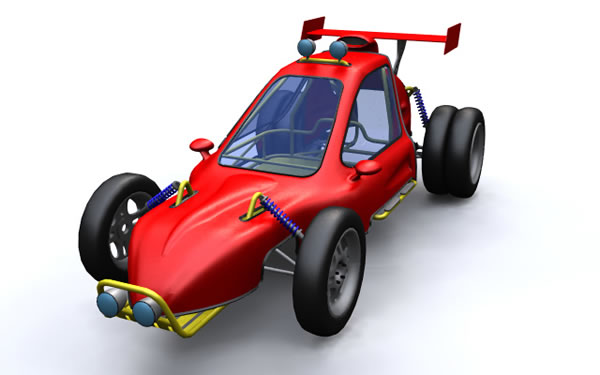
Figure 1.6.12: A dune buggy rendered with an environment light and final gather.