STEP
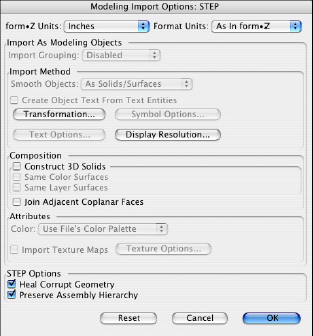
The Modeling Import Options: STEP dialog.
STEP, the Standard for the Exchange of Product Model Data, is a comprehensive ISO standard (ISO 10303) that describes how to represent and exchange digital product information. It defines a neutral file format for representation of configuration control design data for a product. It was developed by an international community for all engineering data, to cover a products entire life cycle, from design to analysis, manufacture, quality control testing, inspection and product support functions. STEP is built on a language, called EXPRESS, that can formally describe the structure and correctness conditions of any engineering information that needs to be exchanged. STEP is open and extensible. STEP is similar IGES in that it is good at representing parametric surfaces including trimmed surfaces. STEP is only available in the modeling environment.
Importing STEP files
A STEP file is imported by selecting the Import... command from the File menu. This invokes the Import standard file dialog where the desired STEP file is selected. There are two STEP specific options, as follows:
Heal Corrupt Geometry: When this option is on, the translator detects and corrects accuracy/tolerance discrepancies that may be encountered in the imported data. This option is on by default.
Preserve Assembly Hierarchy: When this option is on, any assembly hierarchy present in the STEP file will be translated into groups. If this option is off, assemblies read from STEP files will be flattened out. This option is on by default.
Exporting STEP files
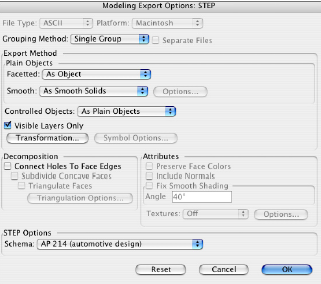
The Modeling Import Options: STEP dialog.
The content of a form•Z project is exported as STEP by selecting the STEP file format form the Export menu from the File menu. This invokes the Export:Step Standard File dialog. Type a name in the name field and click the save button. If the Always Open File Format Options Dialog preference is set in the Preferences dialog. There is one option specific to STEP.
Schema: This menu controls which internal STEP format is written. There are two options:
AP203 (Configuration Controlled Design) and AP214 (Automotive Design). AP214 is the default. You should choose the appropriate option based on the capabilities of software that the file is intended for. With both Schema types, objects are exported with the following characteristics:
• Solid objects are exported to STEP as class VI objects using the STEP identifiers MANIFOLD_SOLID_BREP or BREP_WITH_VOIDS depending upon the data.
• Surfaces are exported to STEP as class IV manifold surfaces using the STEP identifier SHELL_BASED_SURFACE_MODEL.
• Wire bodies are exported to STEP as class II wires using the STEP identifier GEOMETRIC_SET.